For people who plan their own projects

Big plans? Do your level best.

You've got the idea and half a notebook of thoughts. Describe the job once and Level Best's kick-off wizard asks the questions a surveyor would — then drafts the lot: costed best-and-worst budget, task list, dated schedule. It finds rated local trades and writes the enquiry emails too. You do the thinking; it makes sure nothing's missed.

Get early access See pricing
Built by a homeowner mid-renovation, not a software company guessing at one.
1
Describe it

The patio, the loft, the whole house — in your own words, with your budget ceiling and how much DIY you fancy.

2
Answer a few sharp questions

The ones a professional would ask — and you'd much rather face now than in month three.

3
Review your plan, run the job

Budget, tasks and schedule drafted in about two minutes — every line yours to edit, then yours to manage.

A notebook holds the idea. This builds the plan.

Level Best follows the real shape of a home project — estimate, plan, get quotes, do the work, sign off — and keeps the money honest the whole way through.

🪄

A plan in minutes, not months

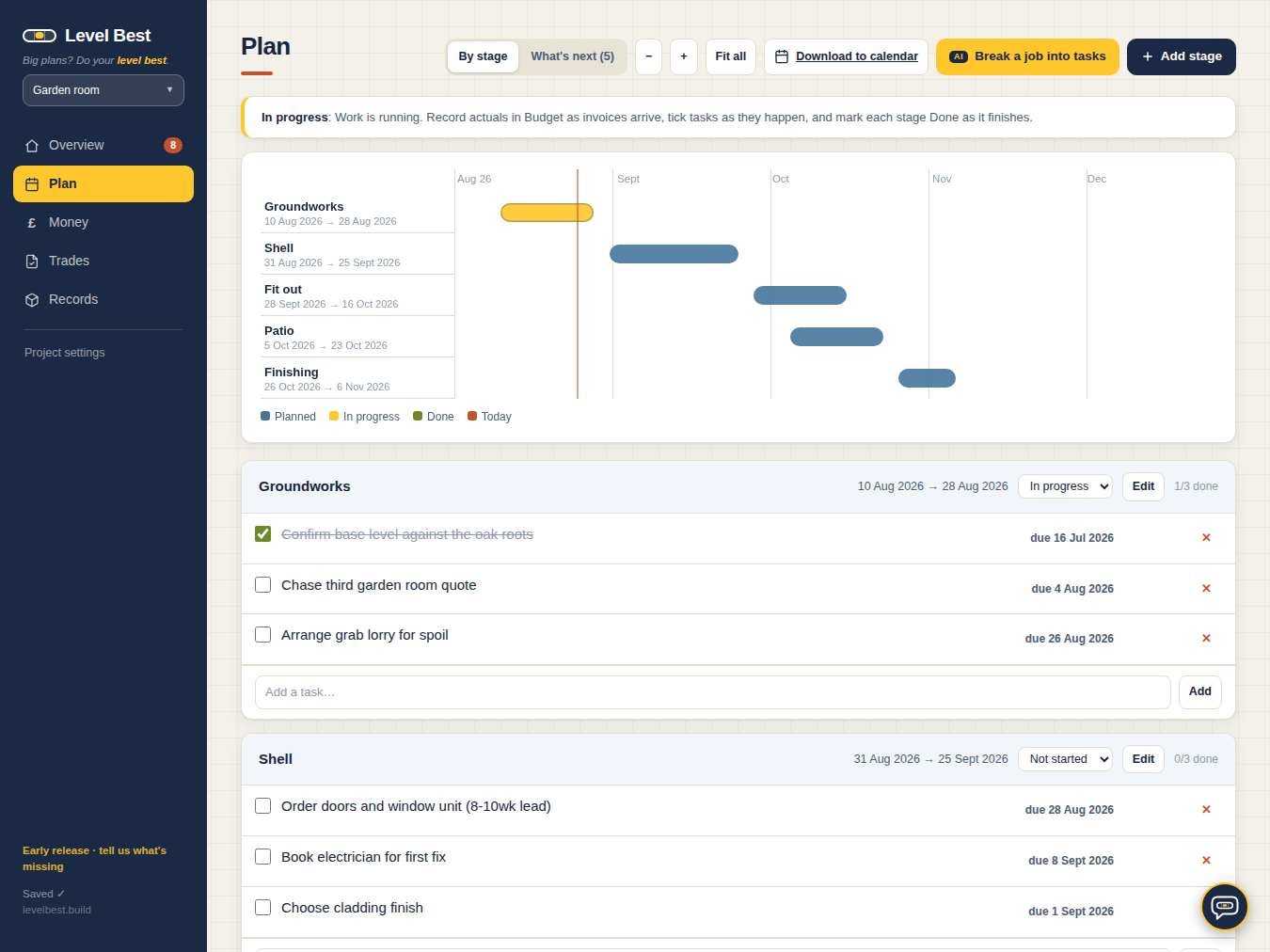
Describe the job — and show it photos of the actual room, roof or drawings. The kick-off wizard asks the questions a surveyor would, then drafts categories, a costed budget, tasks and a dated schedule, approved line by line, by you.

💬

A chat that pulls the levers

Tell it "push the roof stage back two weeks" or "add a task to chase the roofer" — it proposes the change as a button, you click, it's done and logged. It knows your whole project, and it politely refuses to touch quoted money.

📄

It reads the quotes for you

Snap or attach any builder's quote and it extracts the lines, the total, the VAT status — and what the quote suspiciously fails to mention. One click files it. No more retyping someone's PDF.

⚖️

Budgets with honest brackets

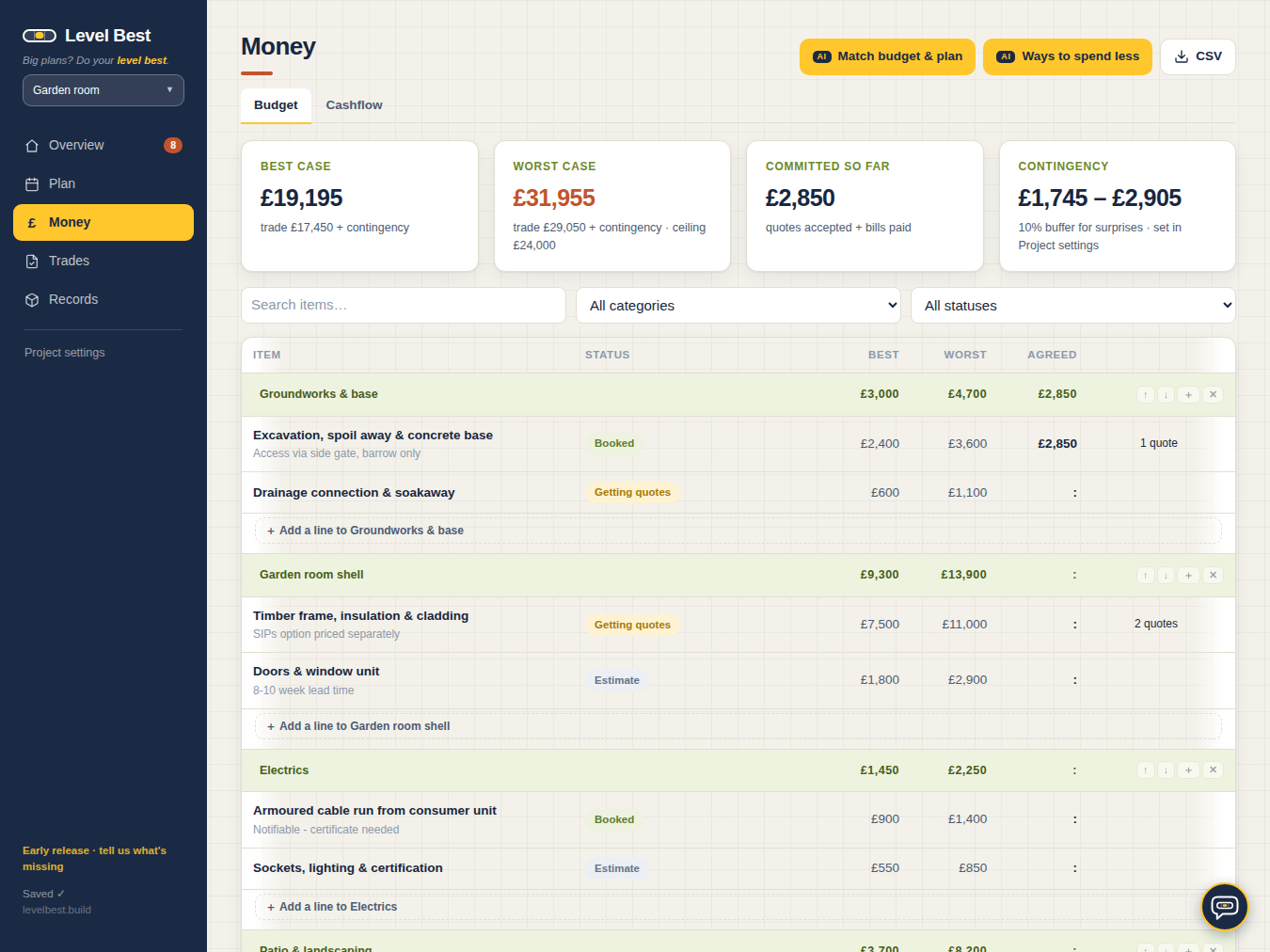
Best and worst case on every line, a ceiling that turns red before it's breached — and when the plan changes, one button reconciles the budget without touching quoted money.

🔍

It finds the trades too

Google-rated businesses near your postcode, shortlisted into a pipeline. It hunts down their contact email and drafts the enquiry — you just press send.

AI that checks today's prices

Searches current UK price guides before committing to a number, then learns from every real quote and invoice you record. Evidence, not vibes.

💷

When the money actually leaves

Cashflow turns stage dates and payment terms into monthly bars — deposits, balances, and the month that bites, flagged before it arrives.

📦

Nothing gets forgotten

A materials list down to the fixings, one-click order reminders timed to lead times, receipts pinned to the exact lines they belong to, and a decision log for "you never said that".

🔔

It chases so you don't

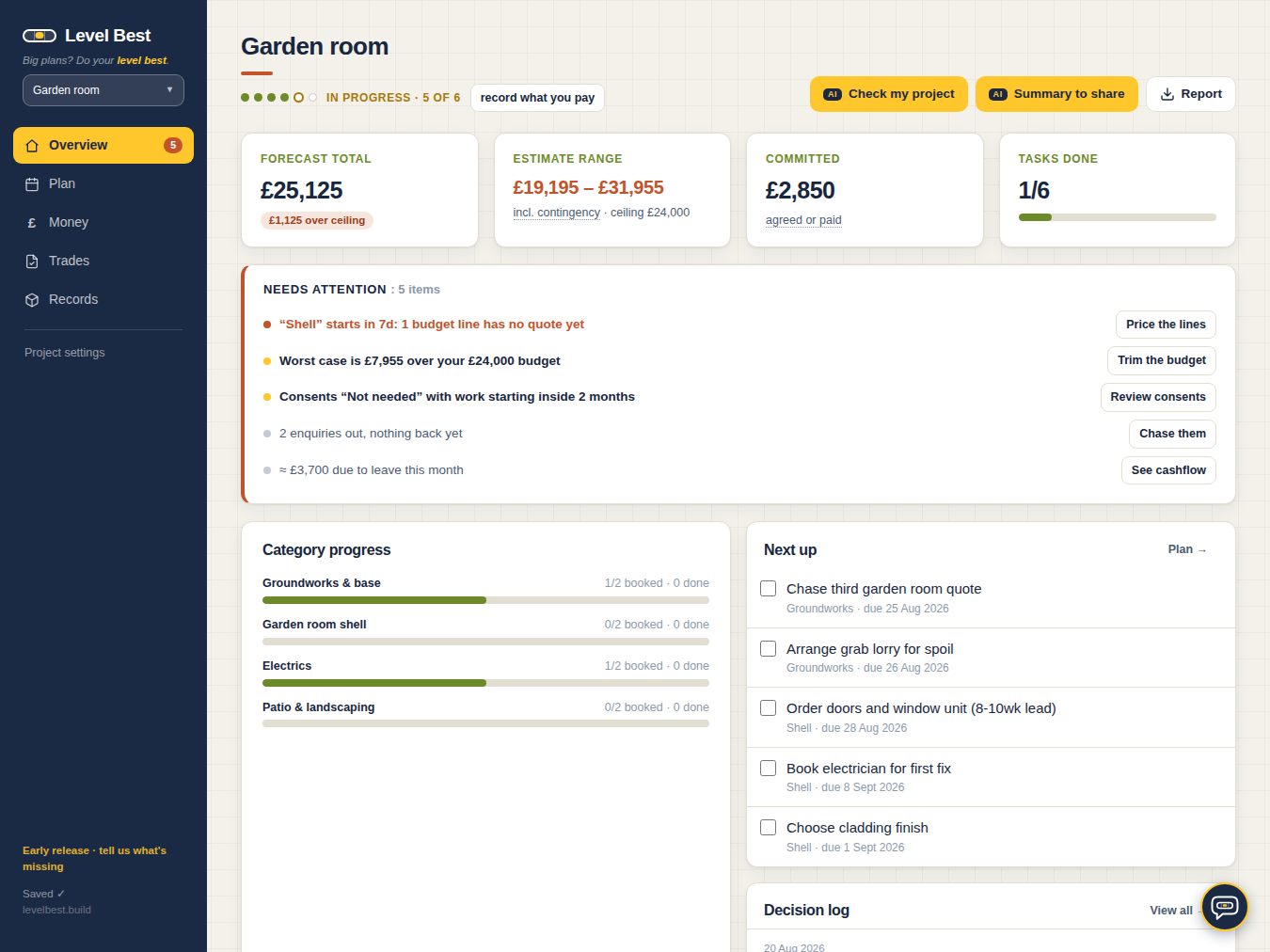
A needs-attention list watches the whole project — tasks slipping, windows not ordered inside their lead time, quotes gone quiet, the month your account takes a beating — and your phone's calendar gets the deadlines too.

Whatever you're plotting around the house.

Describe it, answer a few sharp questions, and a structured, costed plan appears — categories, stages and all. Then it sticks around to run the job.

🏠 Renovations & extensions 🪜 Loft & garage conversions 🍳 Kitchens & bathrooms 🌳 Gardens & landscaping 🧱 Self-builds & outbuildings 🚿 Patios, driveways & garden rooms
"

I'm midway through taking the roof off an 11-metre-square chalet bungalow in Kent — raising the walls, rewiring, new everything. I wanted one place that went from rough estimates through quotes to actually running the build, and couldn't find it. The apps were glorified notepads; the spreadsheets collapsed the day the structural engineer said "ah, now, about your foundations".

So I built Level Best, and I'm using it in anger, every week, on a real build with real money. Every feature exists because scaffolding, a builder or a bank statement demanded it.

— Rich, somewhere under scaffolding in Kent

In the workshop.

What founding members get next — built in the open, priced like it's still early. Because it is.

👥

Share the project

Partner, builder or architect on the same live plan — with you deciding who can touch the money.

📱

On your home screen

A proper app icon for the phone — the plan in your pocket at the merchant's counter.

📐

Plan quantities

Upload the architect's drawings; get draft quantities — m² of flooring and plaster, litres of paint — straight into the materials list.

📸

Snag-list walkthrough

Walk the "finished" job taking photos; get a ticked snag list, each fault tied to its picture — ready to send before the final payment leaves.

🧭

Guides for the classics

Lofts, kitchens, garden rooms, extensions — starting structures tuned by everyone who planned one before you.

"Couldn't I just ask ChatGPT?"

You could. Britain already does — and that's rather the point.

1 in 70
UK AI chats are about the home

Renovations, gardens, furnishing and repairs already make up ~1.4% of everything Brits ask Claude.

No.1 ask
Britain wants advice

"Advice or a recommendation" is the UK's most-requested output — 13.6% of conversations, well above the global 10.7%.

5h → 40m
Planning shrinks with AI

Tasks estimated at ~5 hours solo run to ~40 minutes of AI conversation. The thinking works. The problem is what happens next.

A chatbot on its own

Brilliant answers — provided you know the questions. And with a project you're doing for the first time, you don't know what you don't know.

It forgets your numbers the moment the conversation moves on. Every follow-up starts with you re-explaining the job, and three weeks in, your "plan" is forty screenshots of scrollback and a number you can't find.

You end up project-managing the chat itself.

The same intelligence, given a spine

Level Best asks the surveyor's questions first — the ones you didn't know to ask — then every answer lands as something: a budget line, a task, a date, a warning. Structure, not scrollback.

Its AI re-reads your whole project every single time — your quotes, your prices, your DIY appetite, your deadline — so the fifteenth answer knows what the first one said. And its chat doesn't just advise: show it a photo of the damp corner, tell it to push a stage back two weeks, and it proposes the change as a button — you click, it's done, it's logged.

A chatbot answers questions. This one can pull the levers — and knows which ones are load-bearing.

Home-and-garden figures: Anthropic Economic Index, May 2026 — anonymised, aggregated UK conversation data.

Free to plan. £7 when you want the brains.

The free one is a proper tool, not a demo — one project, every feature, your first plan drafted on the house, and a monthly taste of the assistant. The £7 keeps that assistant at your elbow, without the meter. Founding rate holds for life.

On the House

Free — one project, every core tool
£0 forever
No card, no trial clock, no nagging
  • Budget with best & worst brackets, plan, schedule, cashflow
  • Trade pipeline, materials list, decision log
  • Kick-off wizard included — one full AI-drafted plan, priced against today's guides
  • 20 assistant actions a month — the chat, price checks, quote reading, health checks
  • 10 attachments for quotes and receipts
  • Full export any time — your data, open formats
  • One project at a time
  • When the month's actions run out, the assistant waits for the 1st — or the £7
Start free at launch

Same tool underneath. Free plans the job and gives you a taste of the assistant; £7 keeps it at your elbow for every decision after that.

Reasonable questions

What does free actually include?

The whole tool, for one project: budget with honest brackets, plan and schedule, cashflow, the trade pipeline, materials and the decision log — plus one full run of the kick-off wizard, so the AI drafts your first plan before you've paid a penny. After that you get 20 assistant actions a month — enough to chat to your project, have a quote read or a price checked when it matters, and notice what you'd use if it weren't metered. The £7 removes the meter. No trial clock; free stays free.

Can you see my numbers?

Your data is encrypted, UK-hosted, and used for precisely one thing: showing it back to you. Never sold, never used for adverts, deleted when you say so. We're not in the data business; we're in the £7 business.

Is the AI actually any good?

It's a well-briefed assistant, not an oracle. It prices jobs for your area within sensible brackets, spots what a quote suspiciously fails to mention, and turns "sort out the bathroom" into a task list. You stay the project manager; it just makes you a faster, better-informed one. Nothing it says replaces a structural engineer, and it will tell you so itself.

What if you get bored and shut it down?

Everything exports to open formats — CSV, JSON, your files — in one click, any day you like, on both tiers. If we ever wound down we'd say so plainly and keep the exports open long enough for everyone to leave with everything. No hostages.

Phone? Mac? Windows?

Anything with a browser — the laptop for the big planning session, the phone in the builders' merchant queue. The whole household sees the same live project.

Do I need any planning experience?

No — that's rather the point. You bring the idea and the opinions; the AI asks the scoping questions a professional would, proposes the budget lines you'd forget, and drafts the task list. You stay in charge of every decision — it just makes sure the structure underneath is sound. And under the bonnet it's project-agnostic, so when you one day plan something that isn't a house or garden, it'll cope.

What's coming next?

Draft quantities read straight off your architect's drawings, a photo walk-round that becomes a snag list, sharing the project with your partner or builder (with you deciding who can touch the money), a home-screen app for phones, and guides for the common jobs. Founding prices lock in before any of it lands — which is rather the point of joining early.

Why not just use a spreadsheet?

We did. It was going fine until the second structural surprise, the fourth revised quote and the schedule slipping into a second year. A spreadsheet records a renovation; it doesn't run one. If yours is coping, honestly, keep it — ours is exported to CSV whenever you fancy comparing notes.